A seed phrase is a list of 12 to 24 ordinary words that your self-custody wallet generates once and uses to recreate every private key it holds. Anyone who has the words controls the funds, and no company can reset them for you. Write it down offline, keep at least two copies in separate places, test that it restores, and never type it into a website or give it to anyone who asks.
The first time you set up a self-custody wallet, the app shows you a list of words and tells you to write them down. It is easy to tap “I’ve saved it” and move on. Those words are the single most important thing you own in crypto: lose them and a broken phone can mean lost funds, leak them and someone else can empty the wallet in one transaction. This guide explains what a seed phrase is, how a few words turn into your keys, how it differs from a private key, and how to store one so it survives both thieves and accidents.
What is a seed phrase?
A seed phrase (also called a recovery phrase, secret recovery phrase or mnemonic) is a human-readable backup of the master secret behind a crypto wallet. It is usually 12 or 24 words, and from those words the wallet can regenerate every private key and address it has ever created.
When people talk about “the 12-word secret phrase”, this is what they mean. MetaMask calls it a Secret Recovery Phrase and generates 12 words when you first set up the wallet, and Coinbase’s self-custody wallet also generates 12 words, according to each company’s help pages (checked 13 October 2026). Other wallets use 18 or 24 words. The length changes how much randomness sits behind the phrase, not what it does.
Two things follow from that definition:
- The phrase is the wallet. The app on your phone is just a tool for using it. Install any compatible wallet on a new device, enter the same words in the same order, and you get the same accounts back.
- Whoever holds the words holds the funds. There is no password reset, no support ticket and no way to reverse a transaction on the blockchain.
Where does a seed phrase come from?
Your wallet creates the seed phrase itself, on your device, at the moment you create a new wallet. It costs nothing and you do not need to get one from anywhere else. In most wallet apps the flow is the same: choose “create a new wallet”, the app shows the words, you write them down, and the app asks you to confirm a few of them.
That also answers a question people search for often: you cannot get a “free seed phrase” from a website, a seller or a helper on social media, and you should never use one. A phrase that someone else generated is a phrase someone else already knows. Any funds you send to that wallet can be taken by them at any time.
How a seed phrase works: from words to keys
Almost every modern wallet follows a public standard called BIP-39, first written for Bitcoin and now used across most chains. Here is what happens behind the screen, step by step, according to the BIP-39 specification (checked 13 October 2026).
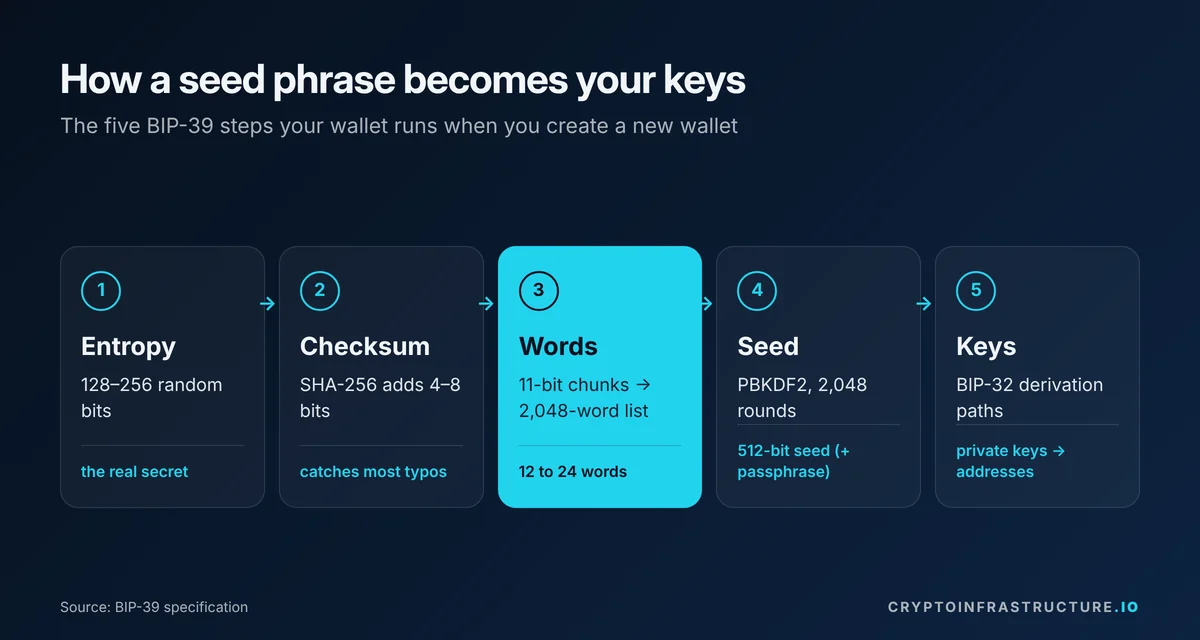
- Random number. The wallet generates between 128 and 256 bits of random data, called entropy. This randomness is the real secret.
- Checksum. It hashes that data with SHA-256 and adds the first few bits of the hash to the end (4 bits for 128-bit entropy, 8 bits for 256-bit entropy). This lets a wallet catch most typos when you type the words back in.
- Words. The combined bits are cut into 11-bit pieces. Each piece is a number from 0 to 2,047, and each number points to one word in a fixed list of 2,048 words. The list is designed so the first four letters of every word are unique.
- Seed. The words are run through a key-stretching function (PBKDF2 with HMAC-SHA512, 2,048 rounds) to produce a 512-bit seed. If you set an optional passphrase, it is mixed in at this step.
- Keys and addresses. The seed becomes the root of a “hierarchical deterministic” wallet (BIP-32). The wallet walks down numbered paths from that root to derive private keys, and from those, public addresses.
The word count follows directly from the entropy size:
| Entropy | Checksum | Words |
|---|---|---|
| 128 bits | 4 bits | 12 |
| 160 bits | 5 bits | 15 |
| 192 bits | 6 bits | 18 |
| 224 bits | 7 bits | 21 |
| 256 bits | 8 bits | 24 |
Source: BIP-39 specification, status “Deployed” (checked 13 October 2026).
How hard is a 12-word phrase to guess?
Some popular explainers quote about 5.4 × 1039 possible 12-word phrases. That number (2,04812) counts every possible string of 12 words, including ones that fail the checksum. Only one in 16 of those strings is a valid BIP-39 phrase, which leaves 2128, or about 3.4 × 1038, valid 12-word phrases. For 24 words the figure is 2256. Either way, guessing a properly generated phrase at random is not a realistic attack. People lose funds because their words are seen, photographed, typed into the wrong site or stored badly, not because someone guessed them.
What the 12 words do in a Bitcoin wallet
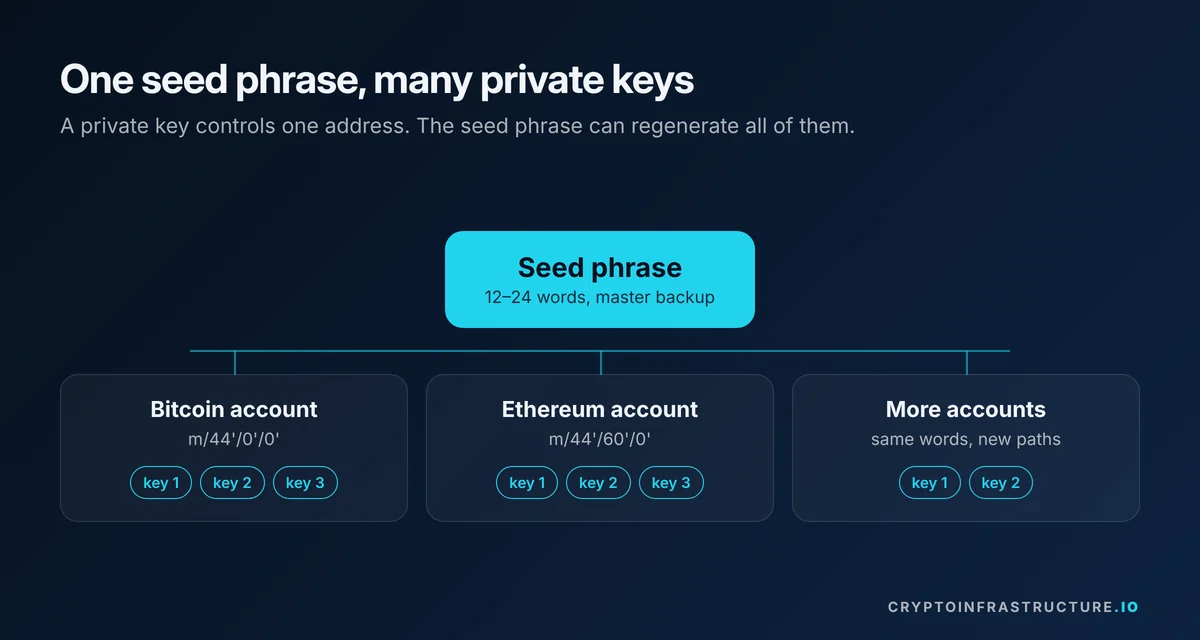
In a Bitcoin wallet, the phrase is the backup for every address the wallet hands you. Each time you click “receive”, the wallet derives the next address on a path such as m/44’/0’/0’/0/0, where 44′ marks the BIP-44 layout, 0′ is Bitcoin’s coin number, and the final numbers count accounts and addresses. Ethereum and other chains use their own coin numbers under the same scheme, which is why one phrase can back up a multi-chain wallet. You never need the phrase to send or receive day to day. You need it when you set up a new device or recover a lost one.
Seed phrase vs private key
A private key controls one address. A seed phrase is the master backup that can regenerate all the private keys in a wallet. You can get from a seed phrase to its private keys, but you cannot work backwards from a private key to the seed phrase.
| Private key | Seed phrase | |
|---|---|---|
| What it is | A long number, usually shown as a hex or encoded string | 12 to 24 words from a fixed 2,048-word list |
| What it controls | One address or account | Every account the wallet derives from it |
| Used for | Signing transactions (the wallet does this for you) | Restoring the whole wallet on a new device |
| Who sees it | Usually nobody; the wallet keeps it internally | You, once, when you write it down |
| If exposed | That one account is compromised | Every account in the wallet is compromised |
Can you access a Bitcoin wallet with only a private key? Yes, for the address that key controls. Most wallets let you import or “sweep” a single private key. You will not get the rest of the wallet’s addresses back that way.
How do you get your private key? Many software wallets have an “export private key” option for each account, usually behind your password. Treat an exported key exactly like a seed phrase: anyone who sees it controls that account. Hardware wallets generally do not let you export keys at all, by design. Note that an account you imported with a separate private key is not derived from your seed phrase, so your phrase will not restore it; back that key up on its own.
Who has a seed phrase: custodial vs non-custodial wallets
Whether you have a seed phrase at all depends on who holds the keys.
- Custodial wallet: an exchange or app holds the keys for you. You log in with an email, password and two-factor code, and the provider can reset your access. You do not get a seed phrase, and you depend on the provider staying solvent and letting you withdraw.
- Non-custodial (self-custody) wallet: you hold the keys. The wallet gives you a seed phrase, and nobody else can recover it.
Does Coinbase use a seed phrase? It depends on which product. A standard Coinbase.com exchange account is custodial and does not give you a seed phrase. Coinbase’s self-custody wallet does: Coinbase’s help center says it generates a 12-word recovery phrase that “only you have access to” and that Coinbase “will never ask for or have access to” it (Coinbase Help, checked 13 October 2026).
The same seed phrase idea applies to hot and cold storage:
- Hot wallet: a wallet whose keys live on an internet-connected device, such as a phone app or browser extension. Convenient for frequent use, more exposed to malware and phishing.
- Cold storage: keys kept on a device that stays offline, usually a hardware wallet, which signs transactions without exposing the key to your computer.
A hardware wallet protects the key while you use it, but it still gives you a seed phrase as its backup. If that paper is stored badly, the cold storage is only as strong as the paper. If you are a business weighing custody options rather than an individual, see the Wallet & Custody Providers section.
What happens if someone finds your seed phrase?
They can import it into any compatible wallet and move everything out. Blockchain transactions are final, so there is no chargeback, and no wallet maker can freeze the funds.
If you think your phrase has been seen, photographed, typed into a suspicious site or stored somewhere that was breached:
- Create a brand-new wallet with a brand-new seed phrase, ideally on a device you trust (a clean phone or a hardware wallet). Do not reuse any part of the old phrase.
- Send everything from the old wallet to the new one as soon as you can.
- Stop using the old wallet and its addresses. Anything sent there later can be taken.
- Work out how the leak happened (a cloud photo, a notes app, a fake support chat, a phishing site) so the new phrase does not go the same way.
- If funds were stolen, report it to the police and keep the transaction IDs.
Moving fast matters because attackers often sweep compromised wallets automatically.
The scams built to get your words
Almost every wallet scam ends with a request for your seed phrase. Switzerland’s National Cyber Security Centre warned on 18 August 2026 that scammers were mailing paper letters in the name of wallet providers, claiming a mandatory “quantum resistance” update and using a QR code that leads to a phishing site asking for the 12 or 24 words. The same NCSC warning lists phishing emails impersonating exchanges and hardware wallet makers, and phone calls that pressure victims to read out their phrase. Cointelegraph reported similar letters sent to Trezor and Ledger customers in February 2026.
The rule that covers all of them: no legitimate wallet, exchange, support agent or “recovery service” will ever ask for your seed phrase. A request for it, by email, letter, chat, phone or pop-up, is the scam.
How to store a seed phrase
Good storage has to beat two opposite risks: someone else finding the words, and you losing them. Here is how the common methods compare.
| Method | Protects against | Main weakness |
|---|---|---|
| Paper, written by hand, kept at home | Online theft | Fire, water, fading ink, being found or thrown away |
| Stamped or engraved metal plate | Online theft, fire and water damage | Still readable by anyone who finds it; costs money |
| Two or more copies in separate locations (for example home and a bank deposit box) | Losing a single copy to fire, flood or theft | More copies means more places someone could find one |
| Photo, screenshot, notes app, email, cloud drive or password manager | Losing paper | Exposed to malware, account takeovers and cloud breaches. Avoid. |
| Memorising it only | Physical discovery | Memory fails, and your family cannot inherit what is only in your head. Avoid as your only copy. |
A practical storage routine
- Write the words by hand, in order, with their numbers, while the wallet shows them. Spell each word exactly; the first four letters identify it, so check those carefully.
- Never type the phrase into a computer, phone, website or document, and never photograph it.
- Make a second copy and keep the two in different physical places, so one fire or burglary does not take both.
- Consider metal for at least one copy if fire or flood is a realistic risk where you live.
- Label copies in a way that does not shout “crypto” to whoever finds them.
- Decide who should be able to reach your funds if something happens to you, and leave instructions that explain where the backup is without writing the words into a will (wills can become readable by others).
Should you split your seed phrase?
Some guides suggest cutting a 12-word phrase into three groups of four words and storing each group in a different place. Be careful with this. Anyone who finds two of the three groups only has four words left to guess, which is at most 2,0484, about 17.6 trillion combinations (244), far fewer than the 2128 of a full phrase. And if you lose any one group, you have lost the wallet unless every group also has a copy.
If you want a split backup, use a scheme built for it. SLIP-0039, a Shamir secret-sharing standard published by SatoshiLabs, creates shares where any set number (say 2 of 3) rebuilds the secret, and fewer than that number reveal nothing about it. SLIP-0039 shares use their own 1,024-word list and are 20 or 33 words long, and they are not interchangeable with BIP-39 phrases, so check that your wallet supports the standard before relying on it. Multisig wallets, where several separate keys must sign, are another option, though they add their own setup and recovery complexity.
The optional passphrase (“25th word”)
BIP-39 lets you add an optional passphrase on top of your words. Every passphrase produces a different, valid wallet, so someone who finds only your words sees an empty or decoy wallet. The trade-off is serious: if you forget the exact passphrase, including capitals and spaces, your words alone will not get your funds back. Only use one if you can back it up as reliably as the words themselves, and keep it separate from them.
How to test your seed phrase
A backup you have never tested is a guess. The most reliable check is a full restore:
- Before you deposit anything significant, write down the phrase and note your first receiving address.
- Reset the wallet (or use a second device of the same type) and choose “restore” or “import existing wallet”.
- Enter the words from your written copy, not from memory.
- Confirm the first receiving address matches the one you noted.
Many hardware wallets also offer a built-in “check backup” feature that verifies your words on the device itself, without exposing them to a computer. Never test by pasting your words into a website or an online “seed phrase checker”. That is one of the most common ways phrases get stolen.
Restored the wallet but it looks empty?
Before you panic, check two things. First, the passphrase: a single wrong character opens a different, empty wallet. Second, the derivation path or account type: wallets do not all use the same paths, so the same words can show different addresses in a different app. Try the wallet you originally used, or look for an “account type” or “derivation path” setting.
What if you lose your seed phrase?
If you lose the phrase but a software wallet still opens on your device, most let you view it again in settings after entering your password or PIN. Do that now, write it down, and store it properly.
If you lose both the device and the phrase, the funds in a self-custody wallet are generally not recoverable. The wallet maker does not have a copy; MetaMask, for example, says plainly that it cannot recover a wallet if access is lost (checked 13 October 2026). Be wary of anyone who offers to “recover” a lost phrase for a fee. Genuine help is limited to cases where you still remember most of the words in order, and handing your partial phrase to a stranger carries its own risk.
Common seed phrase mistakes
- Taking a screenshot “just for now” that then syncs to a cloud photo library.
- Typing the words into a fake wallet app, browser pop-up or “validation” site.
- Reading the phrase to “support” in a chat or phone call.
- Keeping one copy only, in one place.
- Setting a passphrase and not backing it up.
- Using a phrase that someone else generated, or one printed on a card that came in the box with a hardware wallet. Your device should generate the words itself.
- Never testing the backup until the day it is needed.
What this means for you
If you keep crypto on an exchange, you do not have a seed phrase, and your risk sits with the provider. If you use a self-custody wallet, the seed phrase is your whole security model: the strongest wallet hardware cannot help if the words are photographed or lost. Spend twenty minutes once to write it down properly, make a second copy, test a restore, and decide how your family would find it. After that, the only rule you need day to day is the simplest one: never give the words to anyone, for any reason.
For how articles on this site are researched and sourced, read the methodology, and browse more plain-English explainers in Guides.
This article is for information and education only and is not financial, legal or tax advice.